
In today’s world of web technologies, we all can witness a never-ending race for better performance. Developers are trying their best to reduce the size and the amount of downloadable resources and working hard to minimize download time.
Imagine, there is a single-page application, and you use several weighty images, a pair of custom fonts, XML templates, etc. All in all, there is a lot of content that needs to be fetched. Common behavior for any browser is to download this content synchronously (or asynchronously, depending on the type of the content and attributes that allow controlling it). It results in not a very smooth page loading. For example, it might be a jumping text that is loading the heavy font or heavy image that takes too much time to appear.
And how do we usually get around those unpleasant crappy quirks of content rendering?
Standard solutions
One of the most popular solutions is to use loading screen that blocks user interaction showing nice friendly preloader and texts like “Hey man, wait a little bit!”.
After preloader appears, a list of files starting to get loaded and it would ask the preloader to hide when loading accomplished. Then nicely designed page pops up with resources loaded and ready javascript logic. From huge amount of implementations let’s take a look at the simplest one.
function showLoader() {
	document.querySelector('loader').style.display = 'block';
}

function hideLoader() {
	document.querySelector('loader').style.display = 'none';
}

window.onload = function(e) {
	// do some logic when all objects on page will be loaded
	hideLoader();
}

showLoader();
Some of you would say that jQuery implementation can be richer and shorter, I agree! Still, that’s not my point at the moment.
So what have we done about the code block above? We added a listener for “onload” event of window object and when all content preloaded we will run inner code of handler function. You can ask why we haven’t used document.onload? The answer is pretty simple – the last event will be triggered when document body(DOM tree) created, while window.onload will be invoked when all content from DOM tree like images etc. loaded and ready to be rendered.
And what if you need to load content that will not be rendered for a customer immediately or in next few seconds, but you know that it will be used later on this single-page? In this case, you could use the same loader from the previous example but instead of window load event, you should check manually for resources list when it will be fully loaded. The code below shows implementation by using jQuery deferred objects.
var itemsToLoad = ['image1', 'image2', 'image3', 'image4'];
var promises = [];

var loader = $('#loader');

itemsToLoad.forEach(function(element) {
var promise = $.Deferred();
promises.push();
});

$loader.show();

$.when(promises).done(function () {
	$loader.hide();
});
It’s pretty cool that we can load different content and render loader while this process is under way, but it’s just a first step towards the following popular approaches.
Classic lazy loading
Let’s boost complexity a bit and add a couple of different “Views” on our page, usually, it can be done with Angular, Backbone, React or any other MVC framework. The amount of resources grows proportionally to “Views” count. To solve this issue we will try to split resources into blocks depending on “View” where it should be applied. For example, if there are some resources that should be applied to registration “View” they will be loaded exactly in that case and at that time when user would go to that particular “View”.
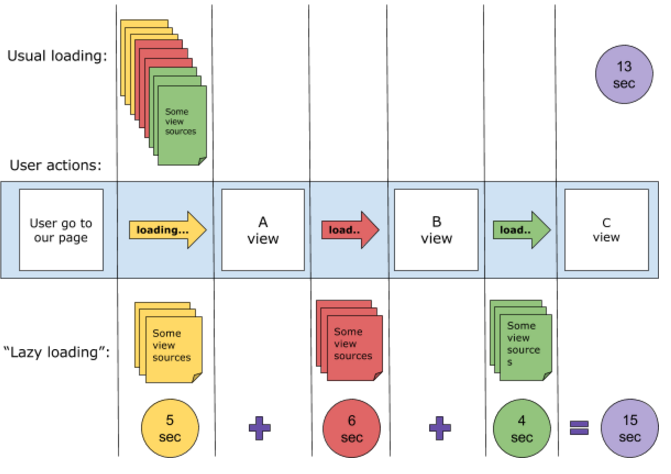
We are splitting resource loading and the preloader would pop-up couple times, but for shorter intervals instead of longer appearance. Such an approach provides faster feedback to users. It also helps us prevent loading unwanted resources in the beginning which sometimes won’t even be used if the user decided to leave a page.
This approach called “Lazy loading” and works similar to a drug store. When a customer comes and asks for something with the recipe(request) she/he only gets items from the list instead of all of thems.
var drugStoreModule = (function() {
   var viewsItems = {
       firstView: ['image1.jpg', 'image2.jpg', 'image3.jpg'],
       secondView: ['image4.jpg', 'image5.jpg', 'image6.jpg'],
       thirdView: ['image7.jpg', 'image8.jpg', 'image9.jpg'],
       fourthView: ['image10.jpg', 'image11.jpg', 'image12.jpg']
   };

   var $loader = $("#loader");

   function loadContent(itemsToLoad) {
       var promises = [];

       itemsToLoad.forEach(function(element) {
           var promise = $.Deferred();
           promises.push(promise);
           element.on('load', function() {
               promise.resolve();
           });
       });

       $loader.show(200);

       $.when(promises).done(function() {
           $loader.hide(200);
       });
   }

   return {
       loadViewItems: function(viewName) {
           loadContent(viewsItems[viewName]);
       }
   };
});

drugStoreModule.loadViewItems('firstView');
Predictive lazy loading approach “Forecaster”!
And finally, let’s think about user sensations. Wouldn’t it be irritating to look at the preloader and frozen controls while you are switching pages? Most likely it would, so let’s try to solve this tiny issue with the following approach that I named “Forecaster”.
We all know that browser saves files to cache and allows other pages to load the same resources later directly from cache. But let’s imagine that there is 70 percents probability that user would navigate to specific page from the current one. Under such an assumption, we can load resources for that next page before the user even pressed “next” button.
Let’s create an application interaction diagram and draw a chain of actions that user would go for with the highest probability.
Here is “Views” queue for user to interact. It can be the same “Views” tree from the previous lazy loading example.
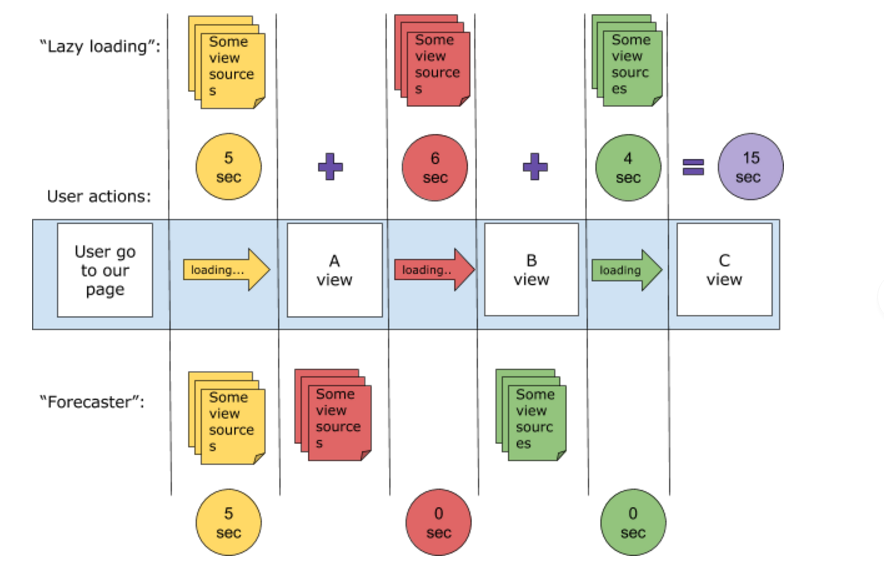
As you can see we are always one step ahead in terms of loading resources and it remains invisible for a user.
Please, find below a simple “Forecaster” module implementation
var drugStoreModule = (function() {
   var viewsItems = {
       firstView: ['image1.jpg', 'image2.jpg', 'image3.jpg'],
       secondView: ['image1.jpg', 'image2.jpg', 'image3.jpg'],
       thirdView: ['image1.jpg', 'image2.jpg', 'image3.jpg'],
       fourthView: ['image1.jpg', 'image2.jpg', 'image3.jpg']
   };

   var $loader = $("#loader");

   var loadedViews = [];

   function loadContent(itemsToLoad, viewName, silentLoad) {
       if (loadedViews.indexOf(viewName) !== -1) {
           return;
       }

       var promises = [];

       itemsToLoad.forEach(function(element) {
           var promise = $.Deferred();
           promises.push(promise);
           element.on('load', function() {
               promise.resolve();
           });
       });

       !silentLoad && $loader.show(200);

       $.when(promises).done(function() {
           !silentLoad && $loader.hide(200);
           loadedViews.push = viewName;
       });
   }

   // first view -> second view -> third || fourth view

   var viewDependencies = {
       firstView: ['secondView'],
       secondView: ['thirdView', 'fourthView']
   };

   function loadNextViewContent(viewsToPrepare){
       viewsToPrepare.forEach(function(viewName) {
           loadContent(viewsItems[viewName], viewName, true);
       });
   }
   return {
       loadViewItems: function(viewName) {
           loadContent(viewsItems[viewName], viewName);
           loadNextViewContent(viewDependencies[viewName]);
       }
   };
});
Even if we are working with more complicated action trees we can still use this approach:
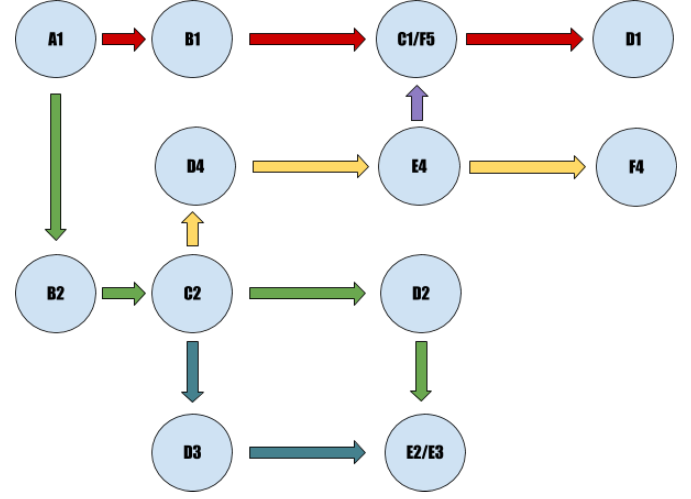
If you look at any node of this tree you will notice the same “View” that has one or several possible outcomes, so you can make all the preparations.
Conclusion
Predictive lazy loading in JavaScript offers significant advantages by optimizing resource loading and enhancing user experience. However, it’s not a one-size-fits-all solution. For applications with minimal views, such a complex approach may not be necessary. It’s crucial to carefully examine the internal structure and complexity of your application to determine the most suitable lazy loading method.
At Trembit, we specialize in developing advanced web applications tailored to your specific needs. Our team of experts is proficient in implementing efficient resource management techniques to ensure your application runs smoothly and efficiently. We are committed to delivering high-quality solutions that enhance performance and user engagement.
Get in Touch
If you’re looking to optimize your web application with advanced techniques, or if you need expert advice on improving your application’s performance, don’t hesitate to reach out. Contact us at sz@preview.trembit.com to discuss your project and discover how Trembit can provide the cutting-edge solutions you need to succeed in today’s competitive digital landscape.